I have been interesting for some time in getting my feet wet in the metal working and have started taking baby steps by purchasing a pair of nibblers, a set of files, and Dremel accessories for metal working. All of this is well and good, for cutting down/destroying large pieces of sheet metal and aluminum stock, but none of these tools work for creating new structures with the lightweight metals that I have access to (steel is a little unwieldy for the novice ok). I recently saw a video for Durafix on youtube (it was a related video to god knows what it was I was looking at on youtube) and think that this would be an great solution for people who are not quite ready to commit to purchasing a welding setup, but are interested in some lightweight fabrication.
Tuesday, June 16, 2009


Tuesday, June 09, 2009
Logitec comfort lapdesk needs to be remixed
 I am sure most people have seen these little desks, I think Belkin makes something similar too but I think that this plastic is or leather design that everyone comes up with will only protect my legs not the laptop from the heat that baby is kicking off. I think that the Logitec one could be improved by replacing that plastic fin with an aluminum one. I am not sure how to pull off the rigid base for the fabric to be attached to, but I will post updated shots of a prototype.
Monday, June 01, 2009
Computers in Plain sight
The Sheeva plug got me thinking about the idea of computers that are innocuous enough to be left in plain sight, but still deliver significant enough computing power to potentially reshape daily life. The Sheeva is powerful but lacks one of the important things that makes computers useful, an interface for humans. The transformative nature of this type of technology comes from interaction, so lacking an included meaningful interaction method we have a computer. I rarely browse Think Geek, but a random link click brought me to their pages where I found the iGala digital photo frame. When I saw it I was posotive that it had to be running at least a little bit of embedded os, and that it had to have some potential for an always on general purpose computer with wi-fi and a touchscreen. One Google search later and I was proven correct that someone else thought the same thing and even went so far as to get shell access for you. When this go back on sale, I am pretty sure that I want one no all I need to know is if ucLinux supports webcams.
My current ideas are controllin a usb Webcam for survellance (or baby monitor), adding audio out for touch screen audio streamer, or using it as a touchscreen controller for home automation. I have to imagine that these are cheaper than anything Crestron has thought of building. Other thoughts include always on Torrent seeder (slow I know, but so low power) capped at 5 connections or something similar. I think that there is a lot of potential here for people with interface design experience.
My current ideas are controllin a usb Webcam for survellance (or baby monitor), adding audio out for touch screen audio streamer, or using it as a touchscreen controller for home automation. I have to imagine that these are cheaper than anything Crestron has thought of building. Other thoughts include always on Torrent seeder (slow I know, but so low power) capped at 5 connections or something similar. I think that there is a lot of potential here for people with interface design experience.
Friday, November 23, 2007
Finally back to breaking things
After a long winter of not working on any projects, the house is finally mostly setup as I want it, and the job is settling into a productive routine; basically its time to start breaking (modifying them if you will).
First up getting that worthless La Fonera running DD-WRT.
For the last year this little toy has been sitting under my dresser as a testament to my lack of fixing ability (my poor delusional family thinks I am the savior of all things running on electricity, when I am little more than a middling hack(sic)).
Certainly it doesn't sound like a hardware hack, but as one of the magnanimous(sic) Fon shoved an update down on it that left it mostly not functional, and on a firmware revision that prevented me from following the instruction here on updating to DD-WRT. There are other guides, but this one had the most pretty pictures for wannabes like myself to follow. Anyway, since the software route didn't appear to be working(at least it wasn't the last time I tried it) I decided to follow this guide to adding a serial port to the Fonera and flashing it over the com port.
So quite some time ago, I ordered one of the Dallas DS275 line powered level converters, and started trying to wire it up using the instructions on the aforementioned page. Needless to say (because I suck) I was unable to get the router to display information over the com. Nearly ready to admit defeat I went back to the uselesshacks guide and notice that the page had been updated sometime since I first tried to upgrade the fon some 2 years ago, there was a hard reset option that took my firmware back to v0.7.1 r1. From there the instructions are very easy to follow, and worked perfectly.
Small success, but it was a project that was holding up the Server in a UPS case project.
First up getting that worthless La Fonera running DD-WRT.
For the last year this little toy has been sitting under my dresser as a testament to my lack of fixing ability (my poor delusional family thinks I am the savior of all things running on electricity, when I am little more than a middling hack(sic)).
Certainly it doesn't sound like a hardware hack, but as one of the magnanimous(sic) Fon shoved an update down on it that left it mostly not functional, and on a firmware revision that prevented me from following the instruction here on updating to DD-WRT. There are other guides, but this one had the most pretty pictures for wannabes like myself to follow. Anyway, since the software route didn't appear to be working(at least it wasn't the last time I tried it) I decided to follow this guide to adding a serial port to the Fonera and flashing it over the com port.
So quite some time ago, I ordered one of the Dallas DS275 line powered level converters, and started trying to wire it up using the instructions on the aforementioned page. Needless to say (because I suck) I was unable to get the router to display information over the com. Nearly ready to admit defeat I went back to the uselesshacks guide and notice that the page had been updated sometime since I first tried to upgrade the fon some 2 years ago, there was a hard reset option that took my firmware back to v0.7.1 r1. From there the instructions are very easy to follow, and worked perfectly.
Small success, but it was a project that was holding up the Server in a UPS case project.
Monday, October 22, 2007
Not Dead just slow
Well since I the last time I posted I have been a busy boy, unfortunately very little of it hacking up hardware. I have been making (slowly) a sweet charging and music playing dock for my Cellphone (Audiovox SMT-5600), the glue seems to always be drying, and always seems to just need one more coat.
Once completed this will let me set my cell phone in the doc for charging, and play music to a 3.5mm headphone jack. I cut down a seat of 2.5mm headphones for the prong and picked up the mini jack at Fry's. The plastic base station came from some cheapo usb camera from Radio Shack (Flat Foto) I picked up on closeout I bought it for a cheap camera to tear to pieces, but the dock so far is much more interesting.
The rest of my time has been dedicated to getting my parents new house up and running with cool gadgetry. The house is a huge 4500Sq Ft with nere a data cable to be seen, too far in the sticks for DSL, and Adelphia the Local Cable Co couldn't even find the house on a map (or with a driver even though we are 7 miles and four turns from their main campus.)
I have wired up the house for the satellite they apparently have to get, and brought a cluster of wires that looked like crap to the inside of the house where it can easily be worked on by yours truly. Run a few lines of data to the office, and set them up on a 3G card from Cingular getting 1.0mbs(reported) Less than 380k sustained (actual). I updated the driver that doesn't support server 2003 officially, copied registry settings from the xp machine, and moved dll's and sys files around until the card began to send a receive data using information gathered by watching the install with total uninstaller.
I was mostly annoyed by the driver telling me that it didn't support server03, when clearly they chose to limit the installer for an ideological reason other than a practical one. The card does not have the "Accelerated" mode, because I didn't get the application that is bundled to run on the server, (more because of time crunch than lack of ability). This is really sad for the parents though as with the accelerated profile, they pull at a reported 1.8m and 386k actual. I think that longterm the choice of server03 is the right one for them, as this box will have no benefit of a Nat firewall to protect them from misc. internet baddies.
Once completed this will let me set my cell phone in the doc for charging, and play music to a 3.5mm headphone jack. I cut down a seat of 2.5mm headphones for the prong and picked up the mini jack at Fry's. The plastic base station came from some cheapo usb camera from Radio Shack (Flat Foto) I picked up on closeout I bought it for a cheap camera to tear to pieces, but the dock so far is much more interesting.
The rest of my time has been dedicated to getting my parents new house up and running with cool gadgetry. The house is a huge 4500Sq Ft with nere a data cable to be seen, too far in the sticks for DSL, and Adelphia the Local Cable Co couldn't even find the house on a map (or with a driver even though we are 7 miles and four turns from their main campus.)
I have wired up the house for the satellite they apparently have to get, and brought a cluster of wires that looked like crap to the inside of the house where it can easily be worked on by yours truly. Run a few lines of data to the office, and set them up on a 3G card from Cingular getting 1.0mbs(reported) Less than 380k sustained (actual). I updated the driver that doesn't support server 2003 officially, copied registry settings from the xp machine, and moved dll's and sys files around until the card began to send a receive data using information gathered by watching the install with total uninstaller.
I was mostly annoyed by the driver telling me that it didn't support server03, when clearly they chose to limit the installer for an ideological reason other than a practical one. The card does not have the "Accelerated" mode, because I didn't get the application that is bundled to run on the server, (more because of time crunch than lack of ability). This is really sad for the parents though as with the accelerated profile, they pull at a reported 1.8m and 386k actual. I think that longterm the choice of server03 is the right one for them, as this box will have no benefit of a Nat firewall to protect them from misc. internet baddies.
Friday, April 20, 2007
Broke the picture frame, time for a rebuild
Finally finishing up with my move to the new house, and in unpacking I discovered a sad thing, the heatsink retention clip on my the picture fame pc broke during the move.
Tragic. (or maybe just a little sad)
either way, must be time for a new project.
Tragic. (or maybe just a little sad)
either way, must be time for a new project.
Tuesday, October 03, 2006
Make vs Buy
I think that we are entering another Buy instead of Make trough. Why would I build my own piece of Kit when Dell offers Entry level server cases with 2 80gig sata drives, dvd-rom, 1gig (2x512) 533mhz, Pentium D(2 x 2.8ghz) for <$500? For the sheer joy of it? That is all I have got left Fry's, Dell, and everyone else is just driving the prices so low I cannot build, I must buy.
Tags: Make vs Buy Convictus Dell Economics
Tags: Make vs Buy Convictus Dell Economics
Sunday, August 20, 2006
The guts and dirt of digital picture frame 2.0
Well the digital picture frame has been on my wall now for little more than a month, and humming along not so silently. The stock fan on the heatsink I decided to use was really annoying me so I took it off and replaced it with a bigger, slower quieter one. While it was off of the wall I thought I should document the innards for posterity.
The original hard drive idea of using a laptop drive died somewhere in my get it done frenzy, and really should be revisited, as I don't like the overall layout when the full side Hard disk is in.
I had to add a slim usb pci card because the onboard usb 1.0 header, is giving me a some servious trouble. The header layout is not well documented, so I cannot tell which pin is one, and only has six pins instead of the normal seven (8 with 1 not in use for a "key") The provided cable is not terminated on both sides, just one so I would have to crimp, or solder the other end.
The wireless ps/2 mouse/keyboard I am using seems to pick up some kind of signal makes the pc think the mouse is being moved. This is not convienient when you are using a screen saver as your "picture frame". As a fix I disconnected the mouse part of the wireless keyboard mouse hookup.
Ordinarily this setup would not even need to have a keyboard/mouse at all, but I have a FON router, I have to logon before the computer can access the internet. Kind of tedious, but the movement is worth a little suffering.
The original hard drive idea of using a laptop drive died somewhere in my get it done frenzy, and really should be revisited, as I don't like the overall layout when the full side Hard disk is in.
I had to add a slim usb pci card because the onboard usb 1.0 header, is giving me a some servious trouble. The header layout is not well documented, so I cannot tell which pin is one, and only has six pins instead of the normal seven (8 with 1 not in use for a "key") The provided cable is not terminated on both sides, just one so I would have to crimp, or solder the other end.
The wireless ps/2 mouse/keyboard I am using seems to pick up some kind of signal makes the pc think the mouse is being moved. This is not convienient when you are using a screen saver as your "picture frame". As a fix I disconnected the mouse part of the wireless keyboard mouse hookup.
Ordinarily this setup would not even need to have a keyboard/mouse at all, but I have a FON router, I have to logon before the computer can access the internet. Kind of tedious, but the movement is worth a little suffering.
Monday, July 24, 2006
Cleaning and Polishing Heat Sinks

Saturday, June 24, 2006
New Media Center Setup
So to try to overcome the stress on the media center I have been building dual proc media center with a raid 0 ~400 gig array to up the storage for all the TV we record. I am not sure if it is just me or the hardware I choose to use, but I cannot seem to get the media center OS to the array on a promise 133ut2 pci raid card. Apparently I cannot even configure the array the way that I have with previous promise pci raid cards. This seems unfortunate as I was hoping to configure 3 drives (2 200's and 1 160gig) into a big old array for OS and all the media that we have to put on it. So I am kind of back to the drawing board and looking through the scrap heap for another pci raid card. Very sad.
Kind of fun getting to show my little brother the process of building a computer the looking for parts and testing each component to ensure that failures are isolated and removed. I am kind of an electronics graveyard so somethings work, others or questionable.
Any how, I am diligently working to complete this "dry run" so we can put the TV tuner cards in and give this baby a spin. Works out great that the wife went to the Chestival (Some country music festival) at the Seahawks stadium and my brother was at a friends wedding all day. Even after a firmware upgrade the pci card didn't give me the option to configure the raid, so I am tediously reading the manual to see if it even supports what I am after.
Tags: Convictus Media Center DVR PC Building
Kind of fun getting to show my little brother the process of building a computer the looking for parts and testing each component to ensure that failures are isolated and removed. I am kind of an electronics graveyard so somethings work, others or questionable.
Any how, I am diligently working to complete this "dry run" so we can put the TV tuner cards in and give this baby a spin. Works out great that the wife went to the Chestival (Some country music festival) at the Seahawks stadium and my brother was at a friends wedding all day. Even after a firmware upgrade the pci card didn't give me the option to configure the raid, so I am tediously reading the manual to see if it even supports what I am after.
Tags: Convictus Media Center DVR PC Building
Friday, June 16, 2006
Need something to do.
Moving on from the digital picture frame and looking for something new to tear apart and make my house a mess, I saw a post about a "Portable Media Center Extender" on hackaday. It immediately excited me as my house hold is becoming a bunch of media center whores and severly over burdening the el cheapo media center I put up. All in all the box has performed brilliantly and I am very happy with the set and forget nature of the beast. Unfortunately for us and our ever increasing number of religiously watched shows, the "season finally" season almost put the nails in the coffin of my media center and nearly got me killed.
I was a little disappointed to find it was a wireless extension of the XBMC. Undetered, I loved the idea and want to make a true wireless Xbox Media Center Extender.
A Few product idea for use:
Video Sender/Reciver
8" LCD TV
Maybe something Like this for a big battery
Tags: Convictus Media Center Portable wireless
I was a little disappointed to find it was a wireless extension of the XBMC. Undetered, I loved the idea and want to make a true wireless Xbox Media Center Extender.
A Few product idea for use:
Video Sender/Reciver
8" LCD TV
Maybe something Like this for a big battery
Tags: Convictus Media Center Portable wireless
Thursday, May 04, 2006
Digital Picture Frame 2.0 part 2
Oh bollocks to Linux. So after too much headache trying to make the drivers for the ZD1211 chipset on my el cheapo airlink+ 802.11g usb adapter. I knew windows would work and saw the post on Make using Slickr to dynamically pull images I decided to go back to what I know rather than flounder with obscure 'make' errors.
It took me 52 minutes to install XP Home, 4 minutes to make a flickr account and 10 minutes to download, install and configure Slickr.
You hear that Linux, 4 weeks of you vs little more than a hour of windowz. Granted that is where the majority of my experience lays, but still.
Pictures to follow....
It took me 52 minutes to install XP Home, 4 minutes to make a flickr account and 10 minutes to download, install and configure Slickr.
You hear that Linux, 4 weeks of you vs little more than a hour of windowz. Granted that is where the majority of my experience lays, but still.
Pictures to follow....
Wednesday, March 22, 2006
Digital Picture Frame 2.0 part 1
So, the new and improved digial picture frame is nearing completion. I have been busy, with life and not had time to document the work that I have been doing with my various projects.
I have changed Jobs and been on vacation for the last little while, turned down what could have been an interesting Job with Gshop.com, and made Lemonchello out of Everclear and a lot of lemons.
After all of that, I have finally gotten around to ordering one of the very small ATX power adapters for my Aaeon motherboards, and am egarly awaiting its arrival. This size will allow me to fit everything, LCD, motherboard and powersupply in the case I build on the back of the picture frame.
In my testing I figured out that the motherboard is not compatible with modern powersupplies. It does not have a power switch header on the board so I will be soldering the green pin and ground to a power button salvaged from a different computer case. For a hard power break I will have an on/off switch on the bottom of the frame for when I need the power off immediately.
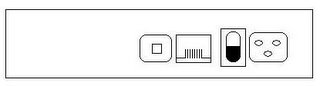
I was thinking something like this would be a good layout:
The os is still going to be Damn Small Linux and I am still going to use Dalbum for the slideshow and power the website with Xammp. I knew that Damn Small was easy to use, but until I did a click and run install of samba, I had no idea how easy it was.
I choose to stick with this combo because I still believe that it is a really flexible solution, and robust enough to run all the time. I will have a pictures directory open as a samba share and my wife can add photos, and browse to the reindex page after she adds photos.
I have changed Jobs and been on vacation for the last little while, turned down what could have been an interesting Job with Gshop.com, and made Lemonchello out of Everclear and a lot of lemons.
After all of that, I have finally gotten around to ordering one of the very small ATX power adapters for my Aaeon motherboards, and am egarly awaiting its arrival. This size will allow me to fit everything, LCD, motherboard and powersupply in the case I build on the back of the picture frame.
In my testing I figured out that the motherboard is not compatible with modern powersupplies. It does not have a power switch header on the board so I will be soldering the green pin and ground to a power button salvaged from a different computer case. For a hard power break I will have an on/off switch on the bottom of the frame for when I need the power off immediately.
I was thinking something like this would be a good layout:
The os is still going to be Damn Small Linux and I am still going to use Dalbum for the slideshow and power the website with Xammp. I knew that Damn Small was easy to use, but until I did a click and run install of samba, I had no idea how easy it was.
I choose to stick with this combo because I still believe that it is a really flexible solution, and robust enough to run all the time. I will have a pictures directory open as a samba share and my wife can add photos, and browse to the reindex page after she adds photos.
Tuesday, March 07, 2006
First try Digital Picture Frame
Every where I read there seems to be a digital picture frame popping up, home made from a laptop, or new product release from a company. Well this is the sad story about the former.
To begin with I picked up the husk of a Toshiba tecra 8100 latop that was about to find its way to the recycle pile. Not much, but from these humble beginings I saw a world of digtial photos rotating by that could be added to via wireless networking. So easy to work with, I could let my wife play with it and never worry about it again.
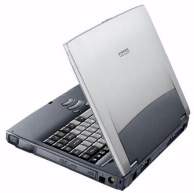
I went ahead and tore apart the Tecra with gusto and here is what was left

I purchased this lovely photo frame partly because it was huge enough to hide any enourmous boxes that I might attach to the back of the frame, and it was nice to look at (aka the wife approved).

This is the unfortunate end of the photo stream. Though the frame was completed and fully configed, the disk controller failed on the board and I was forced to throw out the laptop and hit the drawing board for version 2.0.
The tecra 8100 had a 500mhz proc and 128mb of ram, and I believe a 5gb hard disk. For an os I went with a hard disk install of DSL 2.0 and installed xampp (formerly known as Lampp) The photo software was DAlbum.
Xampp gave me all the simple config of apache and php, and DAlbum was very easy to install after I ran the Xampp auto config scripts. I followed the DAlbum sites instructions on enabling the Slideshow and created an album and index. At first I started looking for ways to force DAlbum to only show slideshows by default, but after searching the the DAlbum Forums I came across someone asking to have DAlbum Slideshows Launch in a new window. The siteadmin explaination of how to open a slideshow in a new window was short, but very insightful. In short I used some of their ideas and created a solution that works well for DSL. When the system first comes up it pops up a dillo webpage with some info, so I edited the config file and pointed it at my on custom launch page that opened my slideshow full screen. All that was left to do was some small edits to the slideshow.php file and this was a very functional slideshow of my photos.
This solution was completed, and Working for little more than 48 hrs. I got cocky and wanted to show people at work what I had done, well typical Seattle for you it rained and got my baby wet. After I get it inside the building and dried off I started to recieve disk controller failure Messages. The drive was fine, but the conroller on the board was done, and since it was a Laptop and doesn't have a 2nd channel I was forced to surrender.
Version 2.0 will be much more robust.
To begin with I picked up the husk of a Toshiba tecra 8100 latop that was about to find its way to the recycle pile. Not much, but from these humble beginings I saw a world of digtial photos rotating by that could be added to via wireless networking. So easy to work with, I could let my wife play with it and never worry about it again.
I went ahead and tore apart the Tecra with gusto and here is what was left
I purchased this lovely photo frame partly because it was huge enough to hide any enourmous boxes that I might attach to the back of the frame, and it was nice to look at (aka the wife approved).
This is the unfortunate end of the photo stream. Though the frame was completed and fully configed, the disk controller failed on the board and I was forced to throw out the laptop and hit the drawing board for version 2.0.
The tecra 8100 had a 500mhz proc and 128mb of ram, and I believe a 5gb hard disk. For an os I went with a hard disk install of DSL 2.0 and installed xampp (formerly known as Lampp) The photo software was DAlbum.
Xampp gave me all the simple config of apache and php, and DAlbum was very easy to install after I ran the Xampp auto config scripts. I followed the DAlbum sites instructions on enabling the Slideshow and created an album and index. At first I started looking for ways to force DAlbum to only show slideshows by default, but after searching the the DAlbum Forums I came across someone asking to have DAlbum Slideshows Launch in a new window. The siteadmin explaination of how to open a slideshow in a new window was short, but very insightful. In short I used some of their ideas and created a solution that works well for DSL. When the system first comes up it pops up a dillo webpage with some info, so I edited the config file and pointed it at my on custom launch page that opened my slideshow full screen. All that was left to do was some small edits to the slideshow.php file and this was a very functional slideshow of my photos.
This solution was completed, and Working for little more than 48 hrs. I got cocky and wanted to show people at work what I had done, well typical Seattle for you it rained and got my baby wet. After I get it inside the building and dried off I started to recieve disk controller failure Messages. The drive was fine, but the conroller on the board was done, and since it was a Laptop and doesn't have a 2nd channel I was forced to surrender.
Version 2.0 will be much more robust.
Sunday, November 20, 2005
Oh wasted time where have you gone
It looks like the hours I spent prepping for my special motherboards was all for naught. Once I finally got the cable kits from the regional distributor (apparently the company didn't have any and needed to make them) I figured out there is no way the case will work. In the regional reps defense Ken the rep I was working with did have to put in quite a bit of effort for what turned out to only be a $70 order out of me. In the end he drove them from Bellevue to my doorstep in Seattle the day he got them (probably to shut me up).
So now that everything is here I set to trying to cram everything into the case. I most likely could get the board ram and proc and a severely modified powersupply into this damn case, but no optical drives and certainly no full sized ide drives. A number of other students from netdesk and I are talking about setting up a domain for testing and finishing our Certifications so I thought one of these could certainly run as a global catalogue server, so I have started looking for a rackmount 1u server case (preferably empty) to host this little side foray.
I designed and priced a custom aluminum 12"x10"x3.24"clam case at emachineshop.com. Holy cow $375 for two really plain custom cases is really steep (in my mind). So $50 for a server case (after shipping) and $20-$30 for a 1u server power supply I think I am better off just using a server case in the end. If I had thought about it I could have saved myself 40 or so hours of grinding, cutting sanding and bending atx case steel, or I could have had the front and back covers made for what that time was worth. lesson learned I guess
So now that everything is here I set to trying to cram everything into the case. I most likely could get the board ram and proc and a severely modified powersupply into this damn case, but no optical drives and certainly no full sized ide drives. A number of other students from netdesk and I are talking about setting up a domain for testing and finishing our Certifications so I thought one of these could certainly run as a global catalogue server, so I have started looking for a rackmount 1u server case (preferably empty) to host this little side foray.
I designed and priced a custom aluminum 12"x10"x3.24"clam case at emachineshop.com. Holy cow $375 for two really plain custom cases is really steep (in my mind). So $50 for a server case (after shipping) and $20-$30 for a 1u server power supply I think I am better off just using a server case in the end. If I had thought about it I could have saved myself 40 or so hours of grinding, cutting sanding and bending atx case steel, or I could have had the front and back covers made for what that time was worth.
Friday, October 21, 2005
Old/Completed Project Redux
Before I started this blog I was actively modifying and building things, I just never thought to write about them. To remedy this and post some of the messes I have created previously read on.
My personal favorite is the desktop rack:
I started with a single rack strip for a rack cabinet from a previous employer that was left over from my setting up their Data Center. I carefully measured the rack strip and determined that it was divisible by 4 in such away that none of the cuts would intersect with a screw hole. I cut the aluminum with carbon fiber cut off wheels and a dreme. After the cuts I had for Approximately 17 in tall pieces that looked like this.

I stacked them together and used zip ties fished through the holes to force them to line up and ground all of them even so that every piece would have the same distance top and bottom to a hole. As a result the rack is level and the holes to line up. I used large 3U rack cabinet spacer panels to form the sides and smaller 1U spacer panels to hold the rack square.
I purchased some Plexiglas and aluminum flat bar stock to create a custom Plexiglas shelf that fit in the top of the rack to help hold it square (though my custom L brackets lack of uniformity cause the whole cabinet to warp slightly.) I have threatened to get 4 custom machined L brackets to fix it, but I was able to flex them enough to get the cabinet to appear to be level that I have never bothered. I use the Shelf to hold a printer and my networking gear in the office, but so as long as we are renting and I cannot pull cable that Switch is going to continue to look lonely.
My personal favorite is the desktop rack:
I started with a single rack strip for a rack cabinet from a previous employer that was left over from my setting up their Data Center. I carefully measured the rack strip and determined that it was divisible by 4 in such away that none of the cuts would intersect with a screw hole. I cut the aluminum with carbon fiber cut off wheels and a dreme. After the cuts I had for Approximately 17 in tall pieces that looked like this.
I stacked them together and used zip ties fished through the holes to force them to line up and ground all of them even so that every piece would have the same distance top and bottom to a hole. As a result the rack is level and the holes to line up. I used large 3U rack cabinet spacer panels to form the sides and smaller 1U spacer panels to hold the rack square.
I purchased some Plexiglas and aluminum flat bar stock to create a custom Plexiglas shelf that fit in the top of the rack to help hold it square (though my custom L brackets lack of uniformity cause the whole cabinet to warp slightly.) I have threatened to get 4 custom machined L brackets to fix it, but I was able to flex them enough to get the cabinet to appear to be level that I have never bothered. I use the Shelf to hold a printer and my networking gear in the office, but so as long as we are renting and I cannot pull cable that Switch is going to continue to look lonely.
Thursday, October 20, 2005
People who post Daily are My Heros
Seriously, who has that much
A. Time
B. Energy
So Engadget and Hackaday(yeah I know they get paid so would I if people read this and click on a few links), way to have more time and energy then I can muster in my 4 days a week off.
A. Time
B. Energy
So Engadget and Hackaday(yeah I know they get paid so would I if people read this and click on a few links), way to have more time and energy then I can muster in my 4 days a week off.
Pimp My Rack
Get Your Rack Pimped!
Appologies in advance to Canford.co.uk but your site layout made me affraid to not take the images to my own host, (and bandwidth leeching is bad). If any of the products you see in this post interest you please go there, these are not my ideas. I just wanted to write about them and have the images.
That said, every thought the data Center was dull and needed a face lift?
Ever thought to yourself while disecting a downed server in your companies cage "I want a $Cold_Alcoholic_beverage"?
Well now you can, that's right Rack mountable accessories!


Appologies in advance to Canford.co.uk but your site layout made me affraid to not take the images to my own host, (and bandwidth leeching is bad). If any of the products you see in this post interest you please go there, these are not my ideas. I just wanted to write about them and have the images.
That said, every thought the data Center was dull and needed a face lift?
Ever thought to yourself while disecting a downed server in your companies cage "I want a $Cold_Alcoholic_beverage"?
Well now you can, that's right Rack mountable accessories!
Monday, October 03, 2005
Carputer: update
All right, I have now acquired a slimline DVD drive, and an atapi/ide converter for use in the car computer. I also have received the motherboard that I intend to use. The boards are the AAEON PCM-6890B which use good old socket 370 procs up to PIII 1.o ghz. Everything on the board is a header, so you can pick and choose what you want to have available in your case. I think that the boards are pretty sweet for embedded development.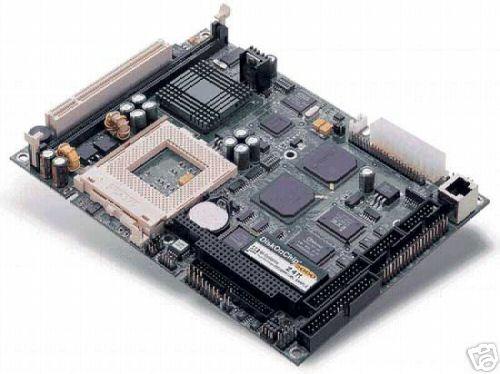
I have now purchased almost everything I think I am going to need to complete the build on this project, the only thing left is the deal breaker, a touch screen interface for the car.
I am very torn on this part of the project as I have several choices, and some of them are down right affordable. I just can't make up my mind to waste $300 all at the same time.
I will try to get some pictures of the board in the new case, but I am fighting a cold and my work has been loosing people left and right so I have been working a lot of extra days. Not to mention, everyone seems to want my time lately.
Tuesday, September 13, 2005
Carputer
So I have started construction on a computer that will live under the seat of my car for mp3's dvd's and gps. (maybe some evdo if the price drops again) :)
Anyhow I have started on the case construction using a KVM that was no longer useful. It was a kvm for the old DIN style mouse keyboard connections. I started by gutting it and am making some custom front and back panels from a discarded atx case.
Here is the Gutted case and the bottom after I ground off the standoff's.


Nice shoes fool! ha, to lazy to edit them out. Any way after I gutted the KVM I needed to make custom front and back panels. I chose to cut these from a piece of steel recycled from an old atx case. Here is a picture of the cut out for the front.


All that is left is to cut out the the back and fill in the holes of the outer case that will not be used.


Yeah, now for the expensive part of all of my projects procurement. I am good at building, I suck at buying parts. Ugh I hate spending that last $200-$500 to finish a project.
Parts needed,
mini-itx motherboard
7" touch screen and mounting
atapi to ide converter for my slim line drive
and a car powersupply
Anyhow I have started on the case construction using a KVM that was no longer useful. It was a kvm for the old DIN style mouse keyboard connections. I started by gutting it and am making some custom front and back panels from a discarded atx case.
Here is the Gutted case and the bottom after I ground off the standoff's.
Nice shoes fool! ha, to lazy to edit them out. Any way after I gutted the KVM I needed to make custom front and back panels. I chose to cut these from a piece of steel recycled from an old atx case. Here is a picture of the cut out for the front.
All that is left is to cut out the the back and fill in the holes of the outer case that will not be used.
Yeah, now for the expensive part of all of my projects procurement. I am good at building, I suck at buying parts. Ugh I hate spending that last $200-$500 to finish a project.
Parts needed,
mini-itx motherboard
7" touch screen and mounting
atapi to ide converter for my slim line drive
and a car powersupply
Subscribe to:
Posts (Atom)